TDS/TCS: Tracking TDS Payable and Deposits
Tax deducted at source is one of the compliance areas where a missed step is costly: deduct at the wrong rate, or not at all, and the expense can be disallowed and interest charged. The TDS/TCS module lists every expense invoice recorded for the client as a potential deduction, with the supplier's PAN and residential status, the applicable section and rate, the running total of payments to that supplier against the threshold, and the deduction and deposit position. This article explains the TDS Payable list and how to work it each month.
On this page
- Opening TDS/TCS
- The TDS Payable list
- Column reference
- Working the list each month
- Frequently asked questions
Opening TDS/TCS
- Open the client and select the TDS/TCS tile on the Client Dashboard.
- The module opens on TDS Payable for the current financial year. Use the Current FY control to switch to the previous year or a date range.
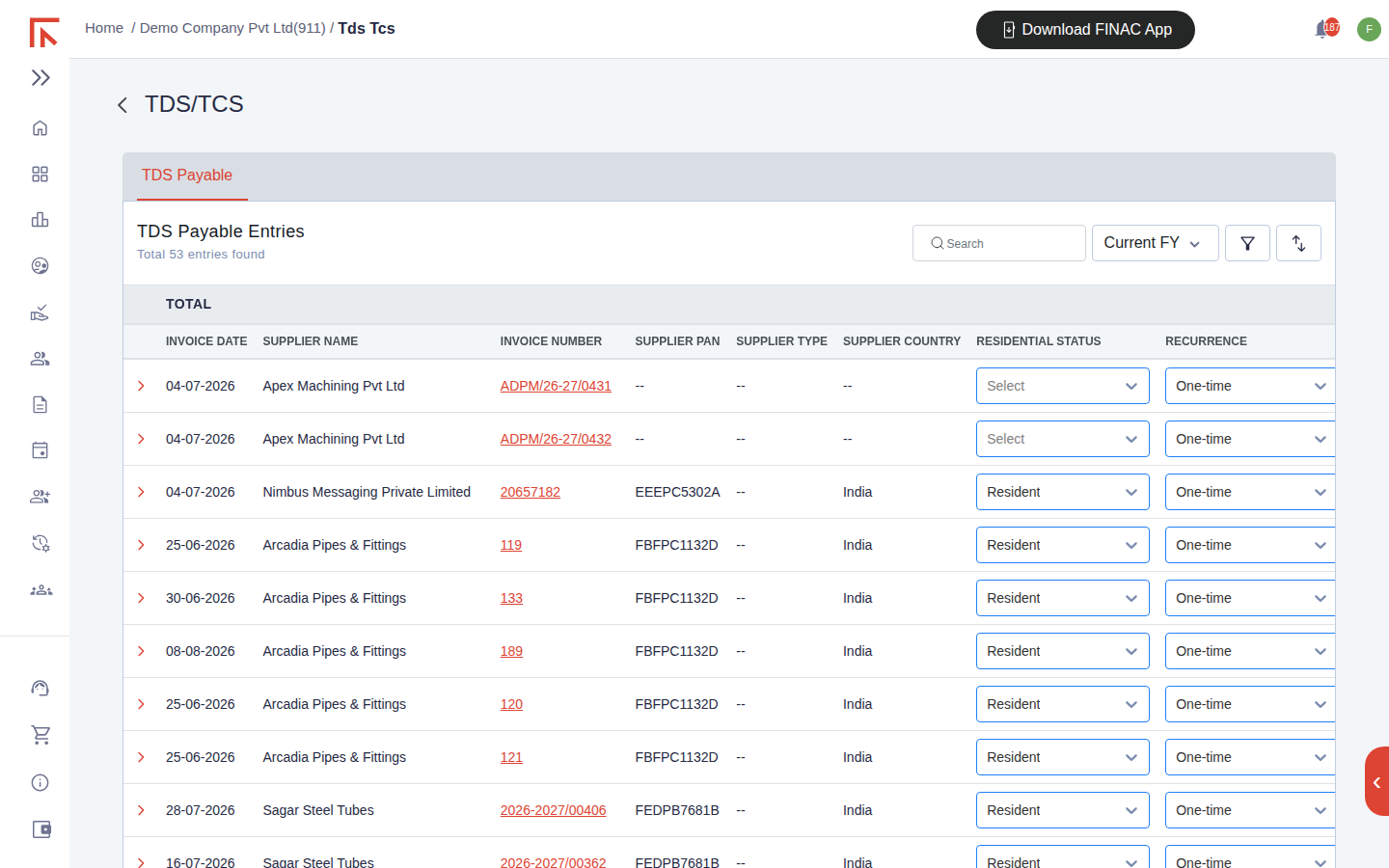
The TDS Payable list
Every expense invoice recorded in Invoicing Advanced appears here as a row, whether or not TDS applies. The TOTAL line at the top sums the taxable amount and the TDS amount for the list, so the first line of the screen is the deduction position for the period. The search box, financial year selector, filter and sort icons work as on other lists.
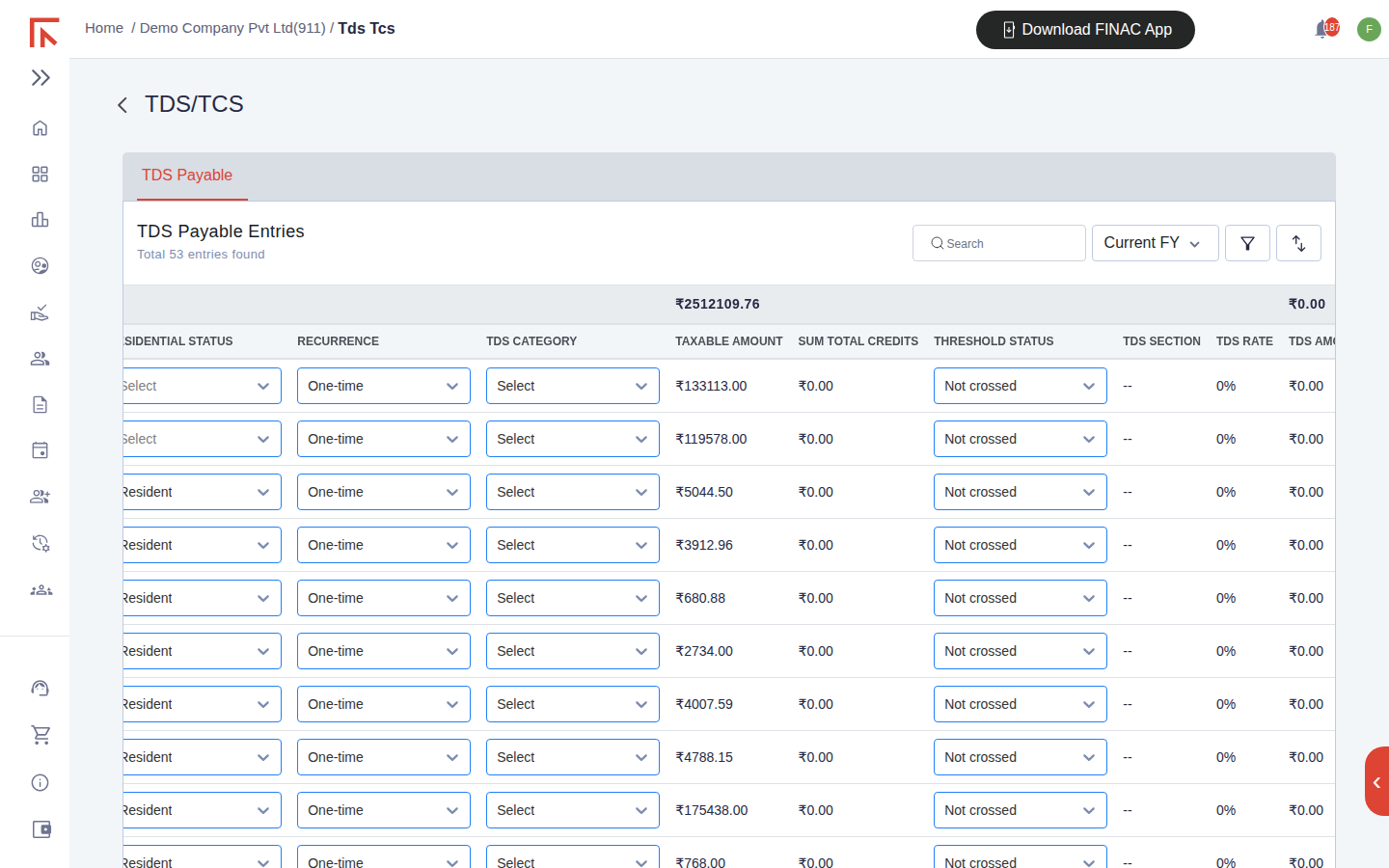
Column reference
| Column | Meaning |
|---|---|
| Invoice Date / Supplier Name / Invoice Number | The expense invoice the row represents. |
| Supplier PAN, Supplier Type, Supplier Country, Residential Status | From the supplier record. PAN determines whether the higher rate for no-PAN applies; Individual against Company and Resident against Non-Resident decide the section and rate. |
| Recurrence | One-time or recurring. A recurring supplier is aggregated across the year for the threshold. |
| TDS Category | The nature of payment: contract, professional fees, rent, commission, purchase of goods and so on. |
| Taxable Amount | The value on which tax is deducted, before GST. |
| Sum Total Credits | The cumulative amount credited to the supplier in the year, used to test the threshold. |
| Threshold Status | Not crossed while cumulative credits stay under the section's limit; Crossed once deduction becomes due, including on earlier invoices in the year. |
| TDS Section / TDS Rate / TDS Amount | The section applied, its rate and the resulting deduction. |
| Lower Deduction Certificate | Yes where the supplier holds a certificate for a lower or nil rate, which overrides the standard rate. |
| TDS Deducted / Deposited Month | Whether the deduction has been made on the payment, and the month in which it was deposited with the government. |
Working the list each month
- Complete the supplier data. Rows with -- under Supplier PAN or Residential Status need the supplier record updated under Settings > Customers/Suppliers. Without a PAN the higher rate applies, so this is the first thing to fix.
- Set the category and section. Where the TDS Category or TDS Section shows Select, choose them on the row. Setting TDS of Expense on the supplier record fills these automatically for future invoices from that supplier.
- Watch the threshold. When Threshold Status changes to Crossed, deduction is due on the payment, and on any earlier payments in the year that were made without deduction.
- Record deduction and deposit. After paying the supplier net of tax, set TDS Deducted to Yes; after paying the challan, set Deposited Month. The TDS Payable ledger in the books carries the balance still to be deposited.
- Reconcile before the return. Agree the TDS Amount total for the quarter to the challans paid and to the TDS Payable ledger before the quarterly TDS return is prepared. The Excel download of this list is the working for that return.
Frequently asked questions
Why do invoices with no TDS appear in the list?
Every expense invoice is listed so that nothing is missed. A row that needs no deduction keeps a 0% rate and a nil TDS Amount; the threshold columns still accumulate the supplier's credits in case a later invoice takes them over the limit.
Where is TCS?
Tax collected at source on sales is set on the customer record (TCS of Income) and applied on the sales invoice. The TDS/TCS module currently presents the TDS Payable view; TCS collected appears on the invoice and in the TCS ledger.
Does the list know the current rates?
The rate is filled from the section chosen and the supplier's PAN and residential status. Confirm it against the current law for the financial year before deducting, and use the Lower Deduction Certificate flag where the supplier has one.